Credit packs, upgrades and what happens to your credits
Updated
Quick answer
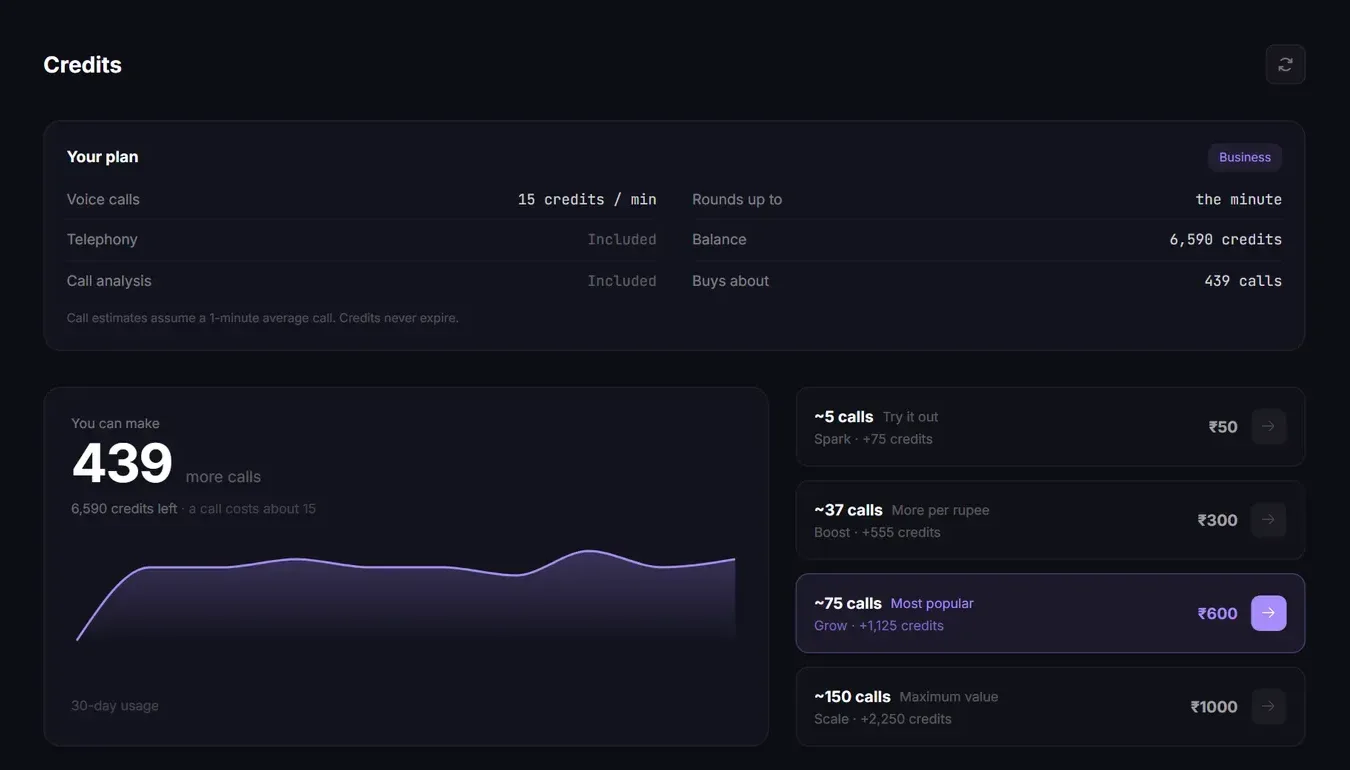
Credit packs are one-time top-ups from ₹50 to ₹1,000 plus 18% GST, bought on the Credits page. Credits never expire, so pack credits stay in your balance when you upgrade, and the new plan's monthly credits are added on top.
Credit pack prices
Packs are one-time payments. They do not renew and they work on every plan, including Free.
| Pack | Price | With 18% GST | Credits | About this many minutes |
|---|---|---|---|---|
| Spark | ₹50 | ₹59 | 75 | 5 |
| Boost | ₹300 | ₹354 | 555 | 37 |
| Grow | ₹600 | ₹708 | 1,125 | 75 |
| Scale | ₹1,000 | ₹1,180 | 2,250 | 150 |
Bigger packs give more credits per rupee. The Scale pack is the best value. Calls cost 15 credits per connected minute, see How credits are charged.
Buy a credit pack
- Open Credits in the sidebar.
- Pick a pack. Each one shows roughly how many calls it buys.
- Check the Confirm purchase box: it shows the subtotal, GST (18%) and the total, plus the billing details that will go on your invoice.
- Click Proceed to pay and pay through Razorpay.
Credits are added as soon as the payment is confirmed. Only the workspace owner can buy credits or plans.
If money was deducted but the credits did not show up, do not pay again. Vyora adds them automatically within a few minutes. If they are still missing after 10 minutes, contact support with the payment ID.
I bought a pack. If I upgrade, do I keep those credits?
Yes. Credits never expire and are never reset. When you upgrade, the plan's credits are added to your current balance, including credits from packs, referrals and your earlier plan.
Example: you have 555 credits from a Boost pack and upgrade to Business. Your balance becomes 555 + 8,000 = 8,555 credits.
How an upgrade is billed
- An upgrade starts a new monthly subscription at the plan's full price (Builder ₹799, Business ₹3,449, plus GST), charged when you upgrade. There is no partial or prorated charge.
- The plan's monthly credits are added right after the first payment.
- The plan then renews every month from that date, and each renewal adds the plan's credits again.
Upgrading from Builder to Business: your Builder auto-pay is not stopped automatically. Email hello@vyora.ai after upgrading so the team can stop it, otherwise both may be charged. Any Builder credits you already received stay in your balance.
If you had a separate dedicated number add-on, upgrading to Business stops that add-on at the end of its current billing period, because Business includes a number. You keep the same number.
Downgrades
There is no downgrade button. On the Plan & billing page, use Need to downgrade? Email us, or write to hello@vyora.ai. A downgrade takes effect from the next billing cycle, and credits you already have stay.
If your plan lapses
If a renewal payment does not go through, or auto-pay is stopped, your workspace moves to the Free plan once the paid period ends. Your credit balance stays as it is and you can keep using it. Features that need a paid plan are locked until you upgrade again.
Other one-time add-ons
These are on the Plan & billing page under Add-ons:
| Add-on | Price | Plans |
|---|---|---|
| Extra agent slot | ₹199 one-time | Free and Builder |
| Extra 1,000 contacts per campaign | ₹99 one-time | All plans |
Related articles
Still stuck?
Write to us with what you tried. A person on the team reads every message and replies by email.