Voicemail detection
Updated
Quick answer
Voicemail detection lets the agent notice when a call reaches voicemail instead of a person. You choose to hang up, leave a summary of the call or leave a set message, and whether to call the number again later. It is in the agent's Call Settings on every plan. A call that connects to voicemail is charged like any other connected call.
What it does
Some calls reach a voicemail box instead of a person. Without detection, the agent treats the recording like a caller, and that time counts as call time.
With Voicemail detection on, the agent recognises voicemail and does what you chose: hang up, or leave a message. It is available on every plan and is on by default.
Switch it on and choose what happens
- Open Agents and click Edit on the agent.
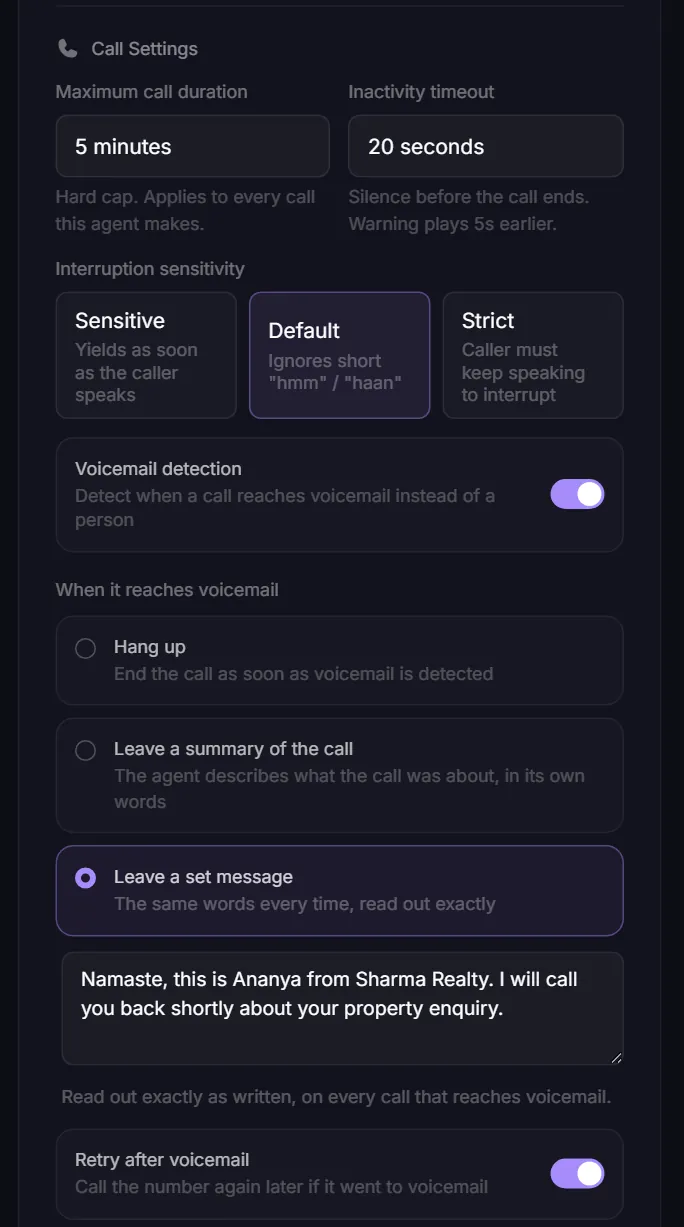
- In Call Settings, turn on Voicemail detection.
- Under When it reaches voicemail, pick one:
| Option | What the agent does |
|---|---|
| Hang up | Ends the call as soon as voicemail is detected |
| Leave a summary of the call | Describes what the call was about, in its own words |
| Leave a set message | Reads out the message you write, exactly, every time |
- For Leave a set message, type the message in the box (up to 500 characters). If the box is empty, the agent falls back to summarising the call, and the editor warns you.
- Turn Retry after voicemail on if you want the number called again later.
- Click Save Changes.
Call Settings apply to the whole agent, including every A/B variant.
What it costs
A call that reaches voicemail is a connected call, so it is charged like any other: 15 credits per minute, rounded up to the next full minute. See How credits are charged.
To spend the least on voicemail:
- Choose Hang up. The call ends as soon as voicemail is detected.
- If you leave a message, keep it short. A set message gives you control over its length. A summary can run longer.
- Retry after voicemail places another call later, and if that one also connects to voicemail it is charged again.
Find calls that reached voicemail
Open Calls in the sidebar. Calls that reached voicemail carry a Voicemail tag, and you can filter the list to show only those calls. See Find call recordings and transcripts.
Related settings
- Maximum call duration (2 to 20 minutes) caps every call, including ones that talk to a recording.
- Inactivity timeout ends a call after silence, which also limits time spent on dead lines.
Related articles
Still stuck?
Write to us with what you tried. A person on the team reads every message and replies by email.